


Deezer: Music & Podcast Player
4.351.19K Reviews
App Specs
- Version
- Varies with Device
- Updated On
- License
- Free
- Downloads
- 100,000,000+
- Developer
- Deezer Music
- Categories
- Music & Audio
- Platform
- Android, iOS
Screenshots




 Analysis by AppCompare
I recently spent some time diving into Deezer: Music & Podcast Player, and I have to say, it’s a solid choice for music lovers out there. From playlists to podcasts, Deezer seems to have a little bit of everything. Let's break it down and see what this app has to offer.
Where Deezer fits into a daily listening routine
I think Deezer makes the most sense for someone who wants music and spoken audio in one place, rather than an app devoted only to albums or only to podcasts. It is a free music and audio app from Deezer Music, with optional in-app purchases. Its Teen age rating is worth keeping in mind if you are choosing an audio app for a younger listener; I would still check what they can find and play rather than treating an age label as a substitute for family judgment.
A practical way to try it is to build a small set of listening options instead of attempting to organize your whole life on day one: one playlist for focused work, one for exercise or commuting, and a podcast show you already know you like. That gives you a quick test of whether Deezer’s mix of personal collections and discovery suits you. If you only want to play a handful of local files you already own, a dedicated music player may be simpler. Deezer is more compelling when you want to search, explore, and keep finding things.
What changes as you use it
Deezer has a 4.2 average from around 3.6 million ratings, and it has passed 100 million installs. Those figures suggest that it is a familiar option for a lot of listeners, but they do not tell me whether its recommendations will fit your taste. The useful test is how it handles your own mix: try a few artists you know well, then see whether suggested tracks feel like a sensible next step or a detour. I would give recommendations a little time to reflect what you actually play before deciding they are either a strength or a nuisance.
It is also helpful to separate the app’s ongoing development from assumptions about particular changes. The version you install is the one to judge: check its current screens and settings, and take note of anything that affects your routine. I would not choose a music service based on a hoped-for future feature. What matters more is whether the present app makes it easy to return to your playlists, locate a podcast, and resume listening without fuss.
Getting Started with Deezer
First things first, downloading the app was a breeze. Whether you’re on Android or iOS, Deezer is readily available in the app stores. Once installed, you’re greeted with a sleek and user-friendly interface that makes navigation a cinch. Creating an account is straightforward, and you can even sign in using your email or connect with Facebook or Google for a quicker start.
Exploring the Music Library
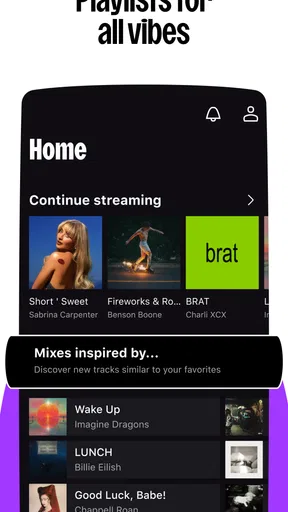
One of the major highlights of Deezer is its extensive music library. With over 90 million tracks, you’re pretty much guaranteed to find your favorite tunes. I was impressed by how quickly I could find even the most obscure songs. The search function is intuitive, and the app’s ability to suggest relevant tracks based on your listening habits is spot on. It’s like having a personal DJ who knows exactly what you want to hear.
Worth Reading Before You Choose

Baby Panda World Brings Quick Play to Modern Phones, but Its Game Library Feels Busy

ESPN’s Live Game View Makes Following Close Games Easier

QuizzLand Review: A Good Fit for Short Trivia Breaks, Not Every Player

Basketball Stars: Multiplayer Is Fast, but Can It Recover When Matches Go Wrong?

WEBTOON Turns Phone Updates Into a Better Reading Routine

Link to Windows Runs on Shared Habits, Not Social Feeds
What I loved was the curated playlists. Whether you’re in the mood for some chill-out vibes or a workout mix, Deezer has playlists for every occasion. You can even create your own playlists, which is perfect for organizing your favorite tracks.
Using playlists and podcasts with a little intention
A playlist is more useful when it has a job. I like making one for a recurring situation—say, a walk that needs steady energy—rather than collecting every song I enjoy in one oversized queue. That keeps the choice simple when I am in a hurry, and it also gives recommendations a clearer signal about the mood I want. A second, less obvious trick is to use a playlist as a temporary listening notebook: add unfamiliar tracks while exploring, then decide later which ones deserve a permanent home.
For a normal weekday, I might start a familiar playlist on the way out, switch to a podcast during a longer stretch of travel, and return to music when I need a change of pace. Keeping both kinds of listening in one app is convenient, though it does not automatically make every handoff seamless. I still check what is queued before pressing play, especially if I am moving between a podcast episode and music; a queue built for one mood can be an awkward start to the next.
Podcasts and More
Deezer isn’t just about music. The app offers a wide selection of podcasts, catering to all tastes and interests. From true crime to comedy, there’s something for everyone. The podcast section is well-organized, making it easy to discover new shows and keep up with your favorites. I found myself getting lost in hours of engaging content, and the app’s recommendations were on point.
Choosing between Deezer and other listening apps
Compared with a service focused mainly on podcasts, Deezer’s appeal is the ability to move between albums, playlists, and shows without changing apps. If your listening is almost entirely spoken-word, though, a podcast-first app may make episode management and long-form listening a more natural priority. Likewise, if you already have a carefully maintained library in another streaming service, switching means weighing Deezer’s discovery and combined audio catalogue against the effort of rebuilding your saved music and playlists.
For people who mainly want radio-style listening with little setup, a simpler radio app may be a better fit. Deezer rewards a bit of interaction: searching for artists, shaping playlists, and steering what appears in recommendations. I would choose it over a bare-bones player when discovery matters, but not just because it has more sections. Extra choice is only a benefit if you will use it.
Sound Quality and Features
When it comes to sound quality, Deezer doesn’t disappoint. The basic free version provides decent quality, but if you’re a real audiophile, you might want to consider upgrading to Deezer HiFi for lossless sound. It’s a noticeable difference, and for those who appreciate high-fidelity audio, it’s worth the investment.
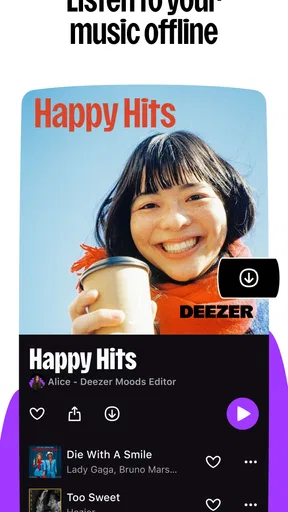
Another feature worth mentioning is the offline mode. This is a lifesaver for those times when you’re off the grid but still want to enjoy your music. Just download your favorite tracks when you’re online, and you’re good to go.
Making offline listening reliable
Offline listening is most helpful when you treat it as preparation, not an emergency fix. Before a commute, flight, or stretch of unreliable reception, I would download the playlist or episodes I expect to use while connected, then open them once before leaving. That quick check helps catch a missing item while there is still time to sort it out. Downloads also need storage, so I would keep a practical travel selection rather than saving every playlist for offline use.
There is a trade-off here: downloading is useful when a connection is poor, but it asks you to plan and manage device space. If you usually have reliable internet and rarely repeat the same music, streaming may suit you better. If you often travel through dead zones, offline access can be a deciding advantage—provided you remember to prepare.
Free listening, paid choices, and expectations
You can begin without paying, which makes it easy to see whether the app’s layout and recommendations work for you before considering an upgrade. In-app purchases range from $2.49 to $218.99 per item, so I would read the purchase screen carefully and compare what a particular option includes with the way you listen. A higher-priced choice only makes sense if its benefits matter to you; it is not automatically the right pick for someone who mainly plays casually in the background.
If you care about lossless sound, check the current plan details in the app before subscribing, since plan names and offers can change. Better audio equipment and attentive listening make sound-quality differences easier to notice; during a noisy commute, that distinction may matter much less. I would decide based on where and how I listen, not on the idea that a premium tier is essential for everyone.
User Experience and Design
The design of Deezer is both modern and functional. The dark mode is easy on the eyes, especially during late-night listening sessions. I found the app to be smooth and responsive, with minimal lag even when streaming high-quality audio. The layout is intuitive, and everything is just a tap away.
Interacting with the app is a pleasant experience, with little touches like lyrics display and artist bios adding to the overall enjoyment. It’s these small details that make Deezer stand out among its competitors.
Where the experience can feel less effortless
Discovery is personal, so a recommendation that feels uncanny to one listener can seem repetitive to another. I would not let a few mismatched suggestions decide the whole service; use search and your own playlists to guide the experience, and treat recommendations as possibilities rather than instructions. The same applies to a large catalogue: breadth is useful when you know what to look for, but it can make browsing feel busy if you want the app to make every decision for you.
There is also a practical distinction between seeing an option and having it available under the terms you want. Free access makes trying Deezer low-commitment, while particular listening preferences—such as lossless playback or dependable offline use—may lead you to examine paid choices. I would check the actual controls and plan information on my device before building a routine around a feature.
What to check before settling in
For someone deciding whether to switch, I would test three things over several listening sessions: whether familiar artists are easy to find, whether new recommendations are genuinely useful, and whether the app makes it comfortable to move between music and podcasts. If one of those is central to your day, give it more weight than a quick first impression of the home screen. A service can look tidy yet still be the wrong fit if its discovery style does not match your habits.
It is sensible to review the current version after installing and again if the app changes in a way you notice. I would watch for practical improvements to navigation, search, playback controls, and offline management rather than expecting a particular new feature. For existing listeners, small changes matter most when they remove friction from a task you do every day; for new users, consistency and easy access to saved listening are more valuable than novelty.
Final Thoughts
All in all, Deezer: Music & Podcast Player offers a comprehensive and enjoyable listening experience. Whether you’re a casual listener or a music enthusiast, there’s something here for you. The combination of a vast music library, engaging podcasts, and user-friendly design makes it a top contender in the streaming world.
If you haven’t checked out Deezer yet, I’d say give it a shot. It might just become your go-to app for all things audio. Happy listening!
Pros
- Extensive music library with diverse genres.
- High-quality audio streaming options available.
- User-friendly interface and navigation.
- Personalized recommendations enhance discovery.
- Offline mode for music and podcasts.
Cons
- Free version has frequent ads.
- Limited skips on free tier.
- Some content region-locked.
- Offline downloads require premium.
- Podcast selection less extensive than music.
FAQs for Deezer: Music & Podcast Player
What features does Deezer offer for free users?
Deezer's free version provides access to a vast library of music and podcasts, though it comes with ads. Users can create playlists and explore curated mixes. However, the free version limits the ability to skip tracks and does not allow offline listening, which is available in the premium version.
How does Deezer's offline mode work?
Offline mode is available to Deezer Premium subscribers. It allows users to download music and podcasts to their device, enabling them to listen without an internet connection. This feature is particularly useful for those who travel frequently or have limited data plans. Downloads remain available as long as the subscription is active.
Can users import their own music into Deezer?
Yes, Deezer allows users to import their own MP3 files into the app. This feature is available under the 'My Music' section, where users can upload their personal tracks via desktop. This allows for a seamless integration of personal libraries with Deezer's extensive catalog.
What are the differences between Deezer Premium and Family plans?
Deezer Premium offers ad-free listening, offline mode, and unlimited skips for a single user. The Family plan, on the other hand, extends these benefits to up to six accounts, making it ideal for households. Each family member gets their own login and recommendations, ensuring a personalized experience.
How does Deezer personalize music recommendations?
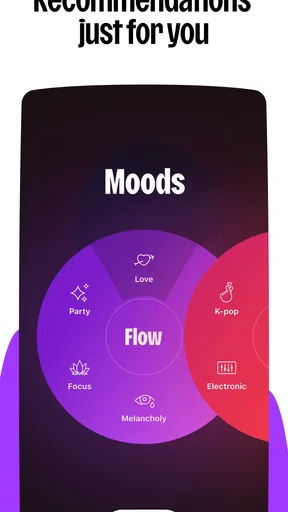
Deezer uses advanced algorithms and user data to tailor music recommendations. It takes into account listening history, likes, and user-created playlists to suggest new tracks and artists. The 'Flow' feature creates a continuous stream of personalized music, ensuring that listeners always have something new and relevant to enjoy.


